

Plan, defend and approveevery AI and workflow decision.
Model the current workflow, propose improvements, compare versions side-by-side, and generate an ROI report grounded in the steps that changed.
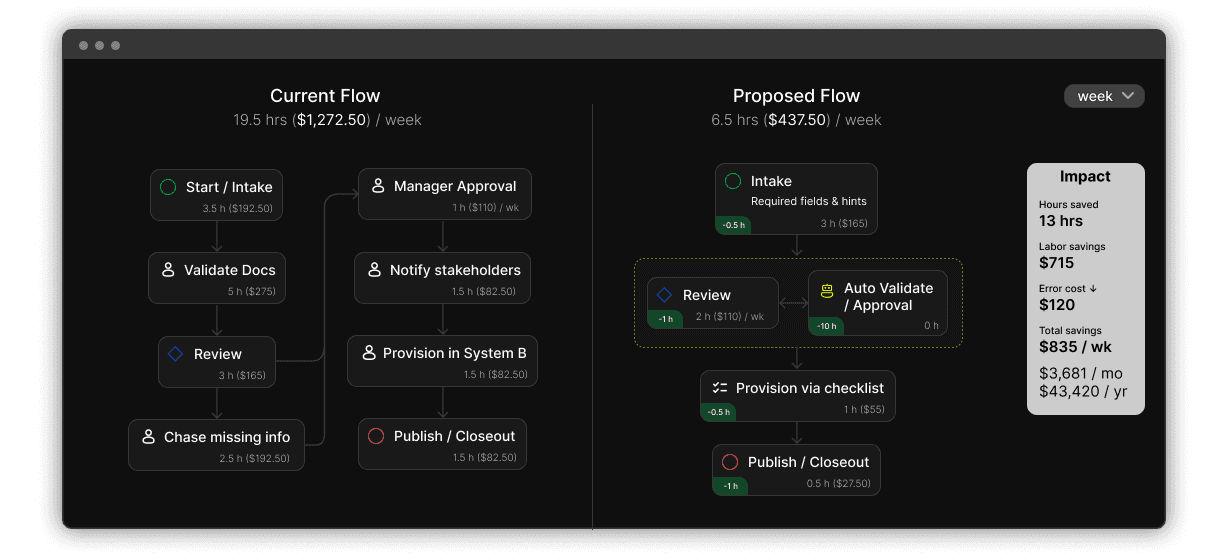
Why teams use Upbiz
Upbiz connects the workflow, the proposal, and the ROI story in one place, so reviews are faster and decisions are easier to stand behind.
Where Upbiz helps
The recurring problem: proposals are hard to review when the workflow is vague and the ROI math lives somewhere else.
Examples
Each example follows the same structure: current state → proposed change → ROI assumptions tied to steps.
Reduce response time without losing quality control.
- Current: manual triage + inconsistent responses
- Proposed: AI drafts + routing; humans handle edge cases
- ROI inputs: ticket volume, minutes saved, escalation rate
Reduce cycle time and manual handling through validation.
- Current: manual entry + frequent exceptions
- Proposed: OCR intake + validation checkpoints
- ROI inputs: invoices/month, minutes per invoice, exception rate
Make ownership explicit to reduce dropped work.
- Current: unclear handoff + missing context
- Proposed: structured handoff steps + ownership
- ROI inputs: lead volume, rework time, handoff failure rate
How it works
Map reality, propose change as a version, compare side-by-side, and explain impact with a report.
Capture steps, handoffs, owners, tools, and notes in one shared view.
- Make the workflow explicit
- Create a baseline
- Avoid proposal confusion
Fill gaps: missing steps, exceptions, checks, and better structure.
- Suggest missing steps
- Refactor structure
- Keep humans in control
Create alternatives without overwriting the current state.
- Preserve today’s workflow
- Explore options
- Keep history organized
See what changed and discuss tradeoffs with shared context.
- Highlight differences
- Reduce back-and-forth
- Make decisions faster
Tie assumptions to the steps that changed for an explainable summary.
- Step-level drivers
- Exec summary outputs
- Grounded in the workflow
Reuse patterns instead of starting from scratch every time.
- Pick a template
- Adapt as a fork
- Share improvements back
Decision Record + ROI Report
Stakeholders want two things: clarity on what changes, and a believable reason it’s worth it. Upbiz makes both easy to review.
- Current workflow + proposed workflow
- Highlighted changes, step by step
- Notes and assumptions tied to steps
- Version history for review
- Executive summary of expected impact
- Delta-based drivers tied to changed steps
- Assumptions you can explain in review
How Upbiz is different
Upbiz is built for proposals that are easy to review: clear workflows, clear changes, and a clear impact story.
Who it’s for
Common contexts where proposals and reviews matter.
What teams say
Pricing
Start simple. Upgrade when you need more workflows, versions, and reporting.
Map workflows and compare proposals.
- Save up to 3 workflows
- Fork and compare versions
- Share workflows publicly
- Use public templates
- Visualize steps, dependencies, and handoffs
- View read-only ROI summaries
Propose changes and generate ROI reports.
- Save up to 20 workflows with version history
- Fork and compare current vs. proposed workflows
- Edit time, cost, and ROI assumptions
- Private workflows and controlled sharing
- Export business-ready summaries (PDF/CSV)
Run audits and proposals across workspaces.
- Organization-wide workflow governance
- Unlimited workflows and client workspaces
- Reusable workflow & ROI templates
- Side-by-side comparisons for proposals
- White-labeled reports
- Lead generation from template views
Plan the change. Show the impact.
Start with a workflow, propose an improvement, compare versions, and generate a report stakeholders can understand.
No credit card needed.